Fleet · 5 min read
The fleet: trains, buses, trams, ships and cable cars
Track is scenery until something moves on it. Rail Island gives you several hundred rail vehicles and four more fleets beside them, and one short workflow for all of them: pick the vehicles, list the stops, press Start.
A train is three lists
Open the Vehicles window and press New train, and you get a board with three tabs. That is the entire model of a train in Rail Island: what it is made of, where it goes, and what it is doing right now.

What Start actually does
A train in Rail Island has no depot and no automatic dispatch. It is a definition — vehicles and stops — until you press Start, at which point the game builds the whole consist on a free platform track at its home station, points it at the end of the track that connects to the network, and sends it toward the next stop.
- At least one vehicle in the consist.
- A home station — the first stop — and at least one more stop after it.
- A platform track at the home station at least as long as the train. A long consist needs a long platform; that is the station length selector doing its job.
- A free platform track: one not already occupied and not covered by another train's reservation.
- A platform that can actually reach the next stop. If none of the home platforms lead onward, the game refuses rather than parking a train somewhere it cannot leave.
Running a fleet
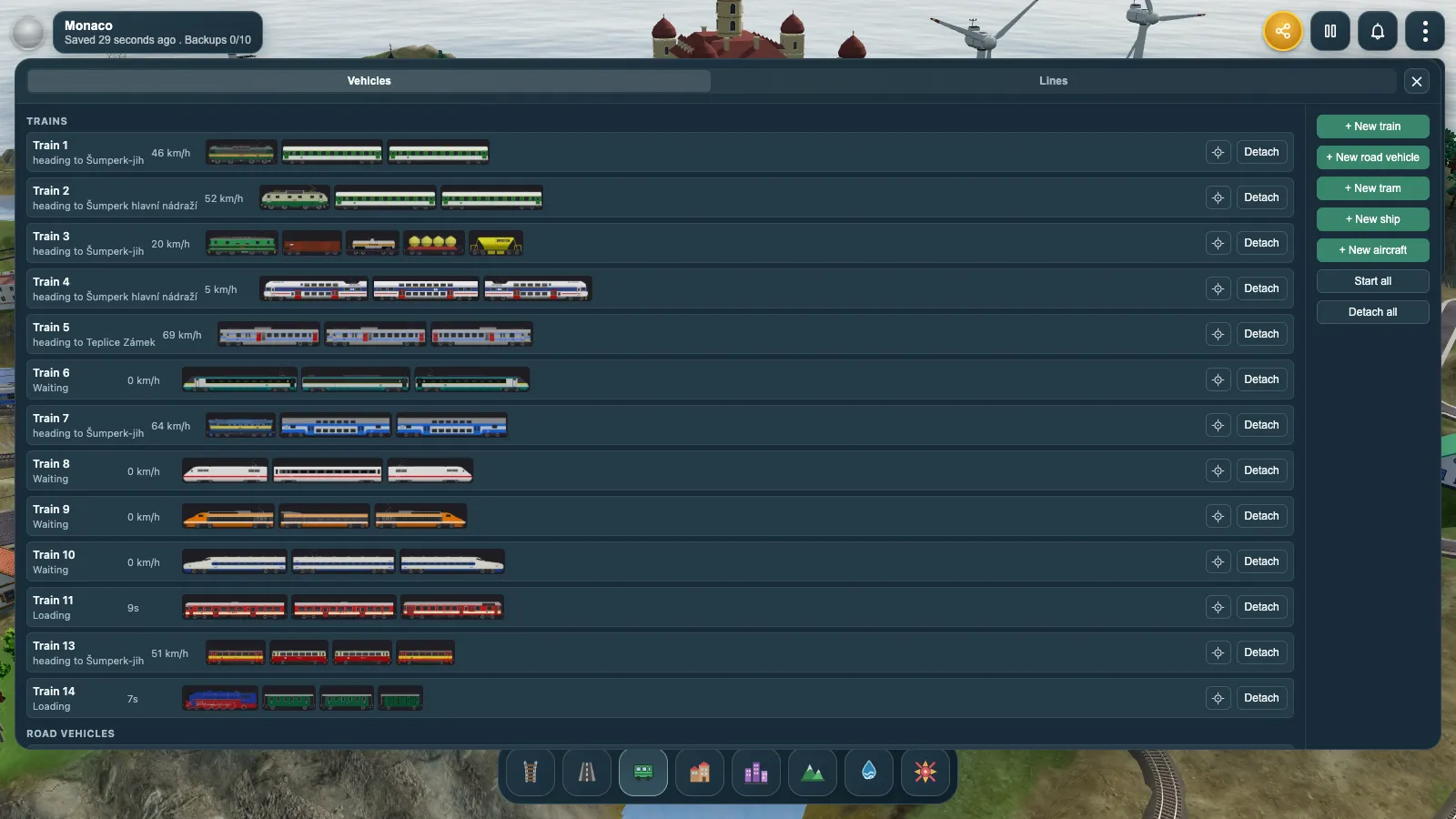
The Vehicles window is the whole fleet on one board — trains, buses, trams and ships together. Each row carries the vehicle's status in words ("heading to Teplice", "Loading"), a live readout that shows speed while running and the dwell countdown while loading, a thumbnail strip of its consist, and one Start or Detach button. Down the side are New train, New bus, New tram and New ship, plus fleet-wide Start all and Detach all.
Buses and trams on the street
Buses use the same board, the same start conditions and the same stop lists as trains — a bus is one vehicle instead of a consist, and it stops at bus stops instead of stations. What is different is the traffic, because roads have no signals.
- They keep a following gap behind anything ahead of them in their own direction, and a bus waiting at a stop simply becomes an obstacle for the one behind it.
- At a junction, one bus at a time gets the crossing; the others hold short.
- On a narrow road, two buses meeting head-on pass each other — one pulls to its own side and stops, the other creeps past it at walking pace, then both carry on.
- At a level crossing with a train coming, every approaching bus stops short. Trains never wait for road traffic.
Trams share all of that, because a tram line is a road. The Road tool has tram types beside the plain ones: a street with a single track down the middle, a wide street with two tracks in the carriageway, or track only on its own ballast bed, in asphalt or cobblestone. The rails, the junction curves and the overhead wire are planned for you as soon as the line connects, and the tram fleet is the Tatra family. Trams call at the same stops buses do — a stop on a street with rails serves both.
Ships and ports
Ships are the one fleet that runs on something you never drew. There are no waterways to build: the sea and the rivers already on your island are the network, and a ship finds its own way across them. What you build are the ports — and a port is to a ship exactly what a station is to a train.
- Six port types, in two families: sea ports with molos reaching out from the shore, and river ports lying along the bank.
- Molos decide capacity — a lane of water on both sides of each one, so n molos berth n+1 ships.
- Ferries, a cruise ferry and an ocean liner, each with its own length and beam.
- A ship refuses water it cannot fit through, so a liner needs a channel a passenger ferry does not.
Cable cars over the hills
A cable car is a rope between two station heads, carried over pylons you drop along it, with cabins hanging beneath. Build the first station, place the second — the rope is drawn live to it while you aim — then add pylons wherever the ground rises. How the line runs depends only on how many cabins you give it: one shuttles back and forth against a counterweight, two set off together and pass at mid-span, three or more circulate continuously in a loop.
Aircraft between your airports
An airport is to an aircraft what a port is to a ship: a structure you place once, in one of three size classes, with a fixed number of stands to park at. A bigger field takes bigger airframes and a light aircraft is happy at any of them, so the class you pick decides what can call there. After that the cycle runs itself — an aircraft boards at its stand, taxis out, waits its turn for the runway, climbs away, and lands at the far end to taxi in to a free stand. You need at least two airports before anything can take off. The runway and each stand are used by one aircraft at a time, so a busy airport queues on the ground; nothing is ever scarce in the air.